
Machine-to-machine access in e-MTA: how to grant it
Since 1 October 2026, payroll data goes to the Estonian Tax and Customs Board straight from payroll software. For that, a representative of the company has to grant one access permission in e-MTA. Here is the step-by-step guide with screenshots, what changed, and why the same permission is needed for the VAT return in 2027.

Since 1 October 2026, starting with October payouts, payroll data goes to the Estonian Tax and Customs Board in a new way: straight from payroll software. For us to send your company’s payroll data, one thing has to be done by a representative of the company: granting the machine-to-machine interface access permission in e-MTA. You do it once and it takes a couple of minutes.
Who this guide is for. Clients of AR Tähelend whose payroll we run in Merit Palk. The registry code below applies to Merit only. If your payroll runs in other software, ask your software provider which service provider to authorise.
Who can grant the permission
A member of the management board, or an owner who has the right to grant access permissions in e-MTA.
Step by step: adding the access permission in e-MTA
The screenshots show the Estonian interface. The English menu names are given in the steps, and e-MTA can be switched to English.
-
Sign in to e-MTA at emta.ee and choose the company you represent.
-
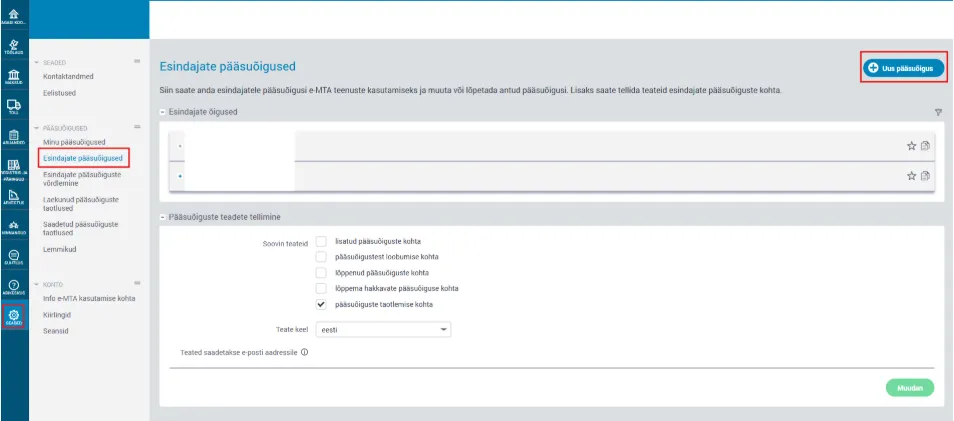
From the menu, choose Settings → Access permissions → Access permissions of representatives (Seaded → Pääsuõigused → Esindajate pääsuõigused).
-
Click New access permission (Uus pääsuõigus).
-
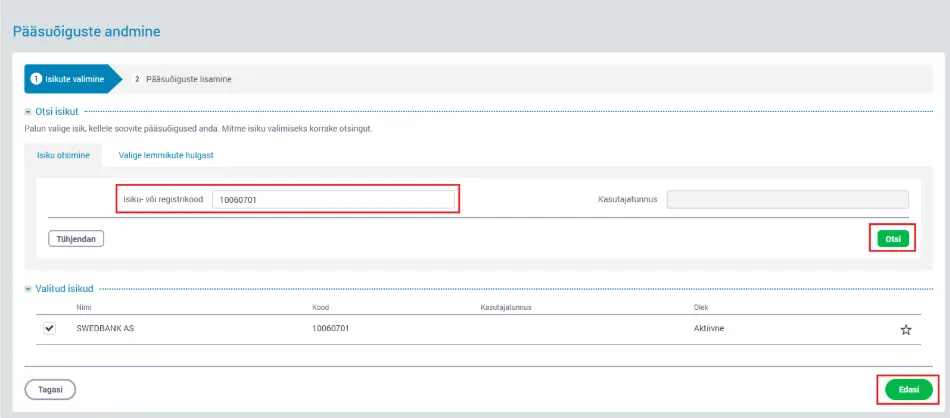
Enter the registry code of Swedbank AS, 10060701, click Search (Otsi) and continue to the next step (Edasi).
-
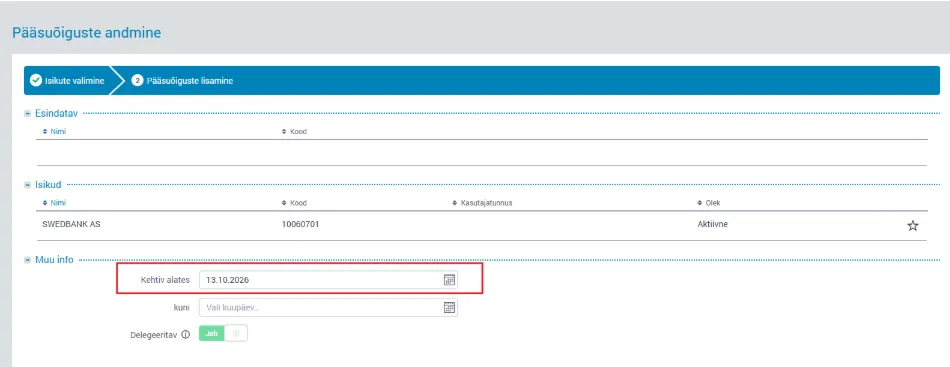
Set the start date of the access permission (Kehtiv alates).
-
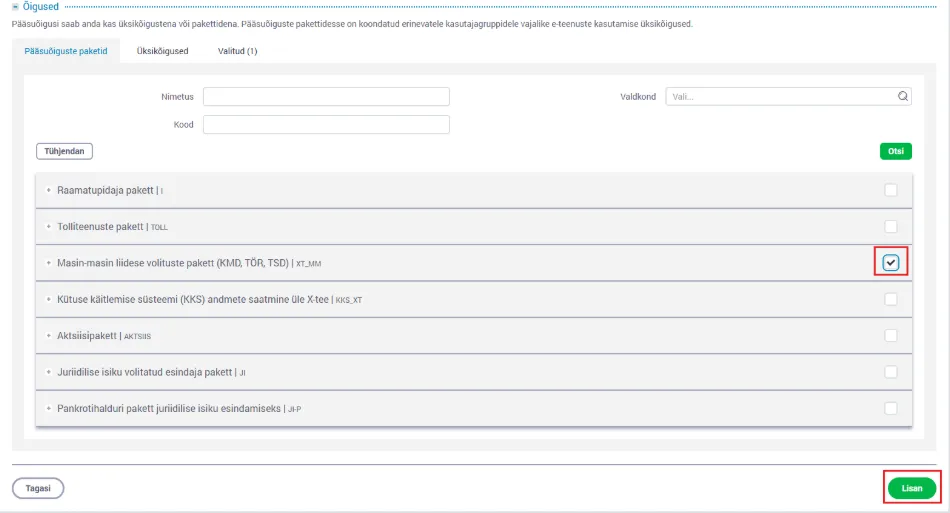
Choose the Machine-to-machine interface authorisation package (KMD, TÖR, TSD), code XT_MM, tick its box and click Add (Lisan).
Once the permission is added, let your accountant know. Then we know we can send the data from the software.
Why Swedbank? Do I have to be a Swedbank customer?
No. Merit Palk uses Swedbank’s security server service to transmit the data. That is why you grant the permission to Swedbank and not to Merit or to us. You do not have to be a Swedbank customer and you do not need a contract with Swedbank.
If your company’s VAT return already goes from Merit Aktiva to the Tax and Customs Board through the machine-to-machine interface, Swedbank already has the permission and you do not need to add a new one.
What changed on 1 October 2026
The tax rates are the same. What changed is the form and the way of reporting:
- The Tax and Customs Board receives data, not a return. The data travels from payroll software through the machine-to-machine interface, and the Tax and Customs Board builds the return (TSD, the income and social tax return) from it.
- The former TSD Annexes 1 and 2 are replaced by a single view of payroll payouts. Nothing changes for TSD Annexes 3–8.
- Data can be sent right after each payout, but there is no obligation to do so. Reporting once a month is still possible. We still report once a month unless a payout needs to be reported separately.
- The TSD deadline is unchanged: the 10th of each month.
What this means for you
- The payroll software has been updated for the change.
- Please note that correcting a payout may no longer be as simple as before.
- If the TSD needs annexes, your accountant fills them in at the Tax and Customs Board, and the TSD can then be confirmed.
- That is why payroll should run in payroll software: filling in the return by hand takes considerably longer.
The same permission is needed for the VAT return in 2027
The package you grant covers the VAT return (KMD), the employment register (TÖR) and the TSD in one go. According to the Tax and Customs Board, from April 2027 VAT data can also be submitted straight from accounting software. So it makes sense to grant the permission now. One step for that change is then already done.
If you get stuck
Write or call your accountant, or get in touch with us. We will go through the steps together.
Sources
- Estonian Tax and Customs Board – TSD filing became data-based (in Estonian)
- Estonian Tax and Customs Board – data-based TSD questions and answers (in Estonian)
- Estonian Tax and Customs Board – granting and termination of access permissions
- Estonian Tax and Customs Board – the VAT return becomes data-based in 2027 (in Estonian)
- Merit Tarkvara – data-based TSD in Merit Palk from 1 October 2026 (in Estonian; steps and screenshots)